

A free charity project for teaching the Holy Quran
Learn the Quran… and taste its fruits
Teaching Quran reading, memorization (hifz) and Tajweed to children from age four and to adults, all in the same home.
Open it in the browser on your phone or computer, or install it on your home screen. It works offline after you open it the first time, and each learner’s progress stays on their device.
- Works offline after you first open it
- No sign-up, no account
- No tracking
- Completely free
- No ads
- In eight languages
For children
A joyful journey where your child gets to know the Book of Allah
For your child from age four: big buttons, short sessions, and a smiling character by their side. No penalties and no red “wrong” marks, and parents are partners in every step.
-
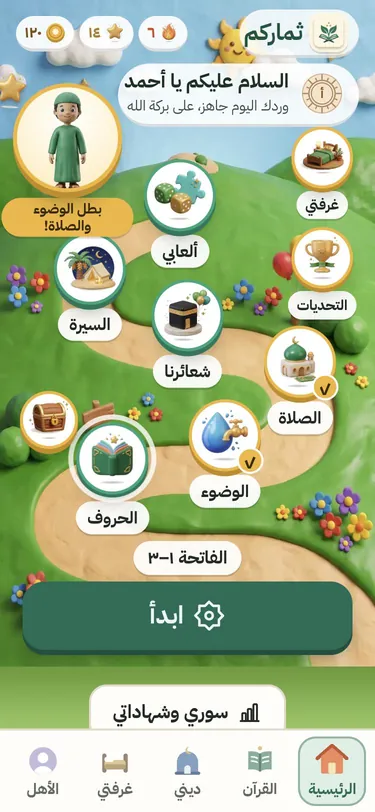
An illustrated journey map
The child’s home screen is a single scene with a winding path, and each station on it opens a section: Letters, Wudu, Prayer, Our Rituals, the Prophet’s Life (Seerah), My Games, and a “treasure chest” that opens the shop. The next station glows to show your child where to continue, and anything they’ve finished shows a mark.
-

The Letter Garden
From the letters to reading Juz ʿAmma, step by step with parents. Short activities: trace the letter, match its shapes, build the word, and read. Every letter your child masters blooms in their garden, and once they finish the reading course, the Tajweed station appears.
-

Learning with parents
The app organizes, and a parent sits alongside: they see the letter or word with full vowel marks and a short pronunciation tip, read it aloud, the child repeats it, and then the parent chooses “He said it right” (or “She said it right”) or “Let’s say it again together.”
The app doesn’t listen to your child or judge their pronunciation. Parents are the ones who listen and encourage.
-

I’m memorizing Juz ʿAmma
A memorization plan for children that starts with Al-Fatiha, then Juz ʿAmma from Surah An-Nas to Surah An-Naba, one Surah after another: three ayahs a day in about ten minutes, with gentle review. And “Today’s portion” waits for them at the bottom of the path with one clear button.
-

Faith Corner (“My Deen”)
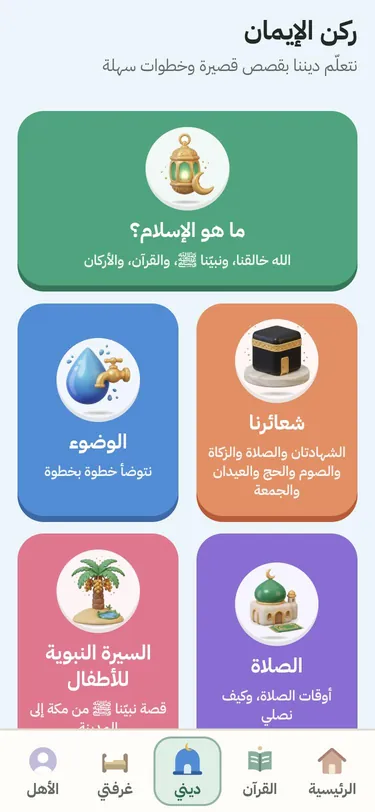
Short stories about Islam, our rituals, and the life of our Prophet Muhammad ﷺ for children: one paragraph per screen in large text, followed by “Remember” and a few light questions.
-

Let’s make wudu, let’s pray
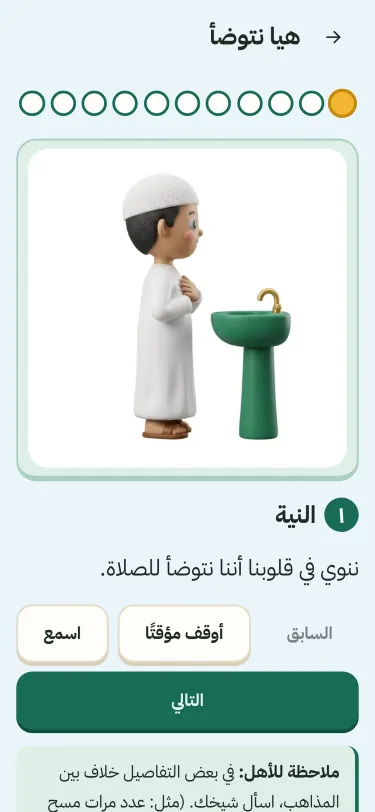
An illustrated step-by-step guide to wudu and prayer, with each step performed by the same smiling child from “My Room,” along with the words of the dhikr or Surah Al-Fatiha where needed.
It also includes a note for parents: “Some details differ between the schools of thought; ask your sheikh.”
-

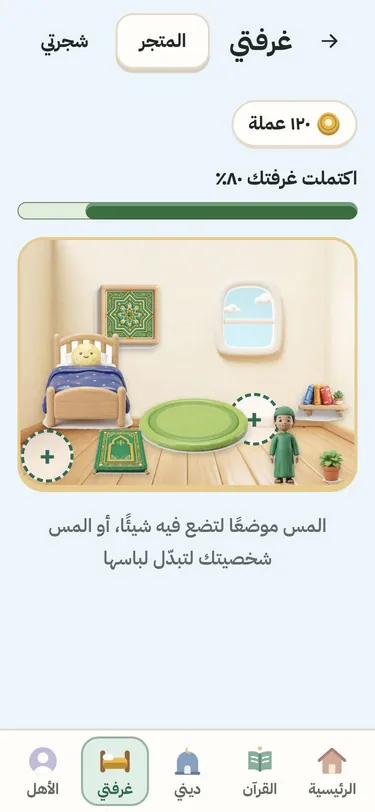
My Room and learning coins
Your child earns virtual coins as encouragement for lessons, memorization sessions and challenges, and uses them to decorate “My Room” with items that include a prayer corner. They can also choose modest clothing for their character: a thobe or everyday clothes for a boy, and a hijab and jilbab for a girl.
The coins can’t be bought with money and have no value outside the app. There’s a daily limit on how many can be earned from lessons and games, which encourages coming back every day instead of doing a lot in a single day.
-

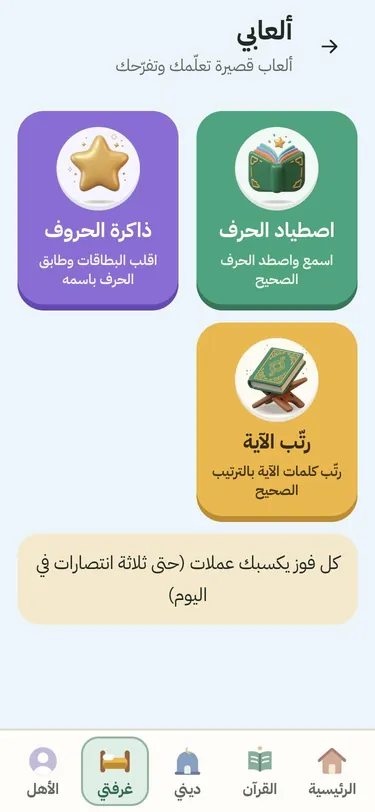
Short learning games
“Letter Hunt” and “Letter Memory,” plus “Order the Ayah,” where your child puts the words of ayahs from short Surahs in the right order, using the same Mushaf text found in the app.
Within the games themselves, coins are earned only by winning, and only for the first three wins of the day.
-

Rewards without penalties
A tree that grows with learning every day, a star for every day they learn, stickers to collect, a printable certificate of encouragement for every Surah they memorize, and gentle daily and weekly challenges; any that aren’t finished simply pass with no penalty. Missed days don’t lock anything, the stars, stickers and tree never shrink, and children are never compared with one another.
For adults
Your Mushaf, memorization and review in one place
For anyone who wants to memorize, strengthen what they’ve memorized, or improve their recitation, at any age. A clear daily portion, review that remembers for you what needs strengthening, and tools that help with understanding.
-

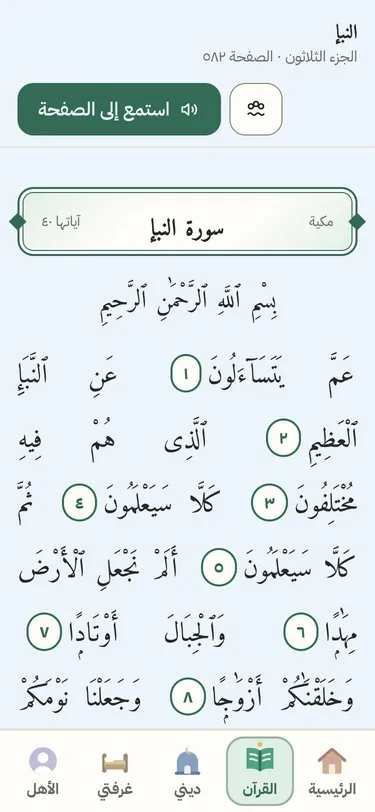
A Mushaf that works offline
The complete Mushaf text in the narration of Hafs from ʿAsim, working offline after you open it the first time. Tap any ayah to listen to its recitation from that point (online or from recitations you’ve downloaded), repeat it, read its tafsir, or copy it. And three themes that are easy on the eyes: Light, Dark, and “Mushaf,” in the color of Mushaf pages.
-
Three reciters, five recitations
Sheikh Mahmoud Khalil Al-Husary and Sheikh Muhammad Siddiq Al-Minshawi, may Allah have mercy on them, with two recitations each (the teaching Mushaf and Murattal), and Sheikh Mishary Rashid Alafasy. Download the recitations of the Surahs you want to listen to offline, and control playback from the lock screen on devices that support it.
The recitations are from EveryAyah.com, with our thanks and full credit.
-
Tafsir and similar ayahs
Al-Tafsir Al-Muyassar (King Fahd Complex for the Printing of the Holy Quran) for every ayah with a single tap, shown exactly as published, unedited and credited to the Complex. Plus an alert for ayahs with similar wording, with the differences highlighted in color. These are calculated automatically from the text, not taken from an edited scholarly list.
-

Today’s portion is ready
The “Today” page shows what’s new, what’s up for review, and how long it should take, with a single start button. Ready-made plans you can adjust: “Unhurried,” “Half a page a day,” “A page a day,” “Surahs I choose,” and “Listen only,” with rest days you pick and an estimate of when you’ll finish the plan.
-
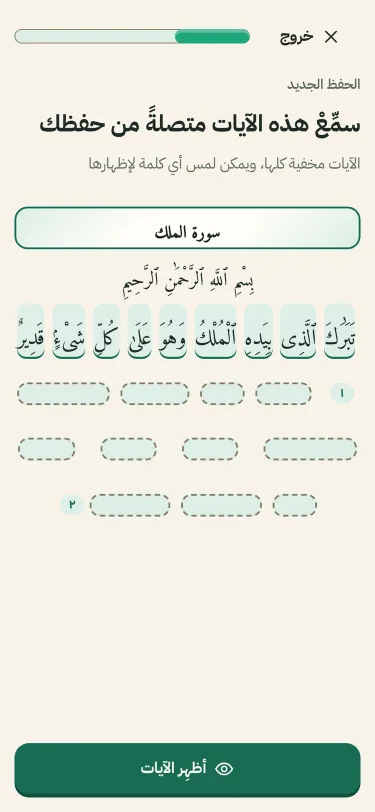
A step-by-step memorization session
Listen, then repeat, then read on your own, then test yourself as the words are gradually hidden, then link the ayah to the one before it, then recite the whole passage from memory. If you like, record your recitation and listen to it next to the reciter to compare by ear. The recording never leaves your device.
-

Smart review
Spaced-repetition review for every ayah, the “new, recent and distant” system, and a session for the ayahs that need strengthening. During review, you tap the ayah where you stumbled, and it comes back to you when it’s due.
-

Sahih al-Bukhari and Sahih Muslim
The Arabic text of the two Sahihs of Imam al-Bukhari and Imam Muslim, may Allah have mercy on them, with a search that isn’t thrown off by vowel marks or the different forms of hamza, favorites saved on your device, and the option to download each Sahih for offline reading.
The text comes from an open source and has no commentary or translation.
-

Tajweed
A Mushaf color-coded with Tajweed rules that you can turn on if you like. Each rule has its own color and a distinctive underline style beneath it, so you don’t have to rely on color alone. Plus the “Master Tajweed” lessons in nine units: a one-minute explanation, examples from the Mushaf you hear in the reciter’s voice, and exercises on ayahs from the Mushaf itself.
Learning directly from a skilled sheikh is the foundation of Tajweed.
-
Manners, rulings and understanding
Twenty-three short lessons in four sections: manners of recitation and of the one who carries the Quran, rulings related to recitation, an introduction to the sciences of the Quran, and understanding the Quran. Each lesson has a summary, short paragraphs and a few light questions at the end.
And the lessons point out where scholars differ, where needed.
-

“Step by step”
For those who need to go gradually and for older adults: one ayah per screen in very large text, split at the pause marks, and a short session that the app ends on its own, saying “That’s enough for today.”
-

It’s never too late to learn to read
Adults can start the reading course from any lesson that suits them, moving step by step from the letters to reading Al-Fatiha and Juz ʿAmma.
For the family
The whole home learns, and parents have peace of mind
A mother and her children, or a father and his kids, on one device, each with their own profile and progress. And parents have tools to follow along and to protect the grown-up sections.
-
Several learners on one device
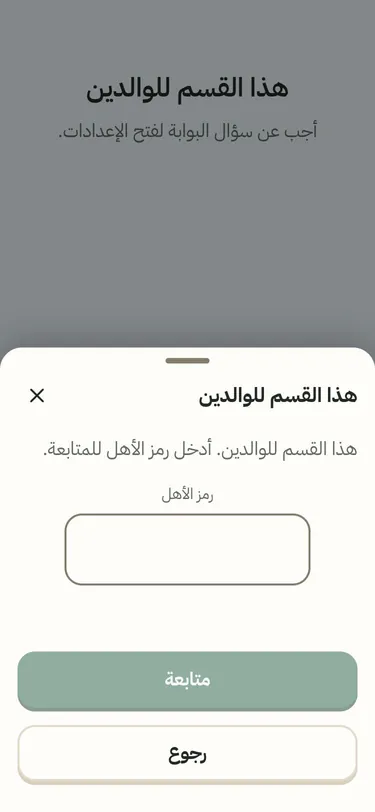
A profile for each little one and each grown-up, each with their own badge and progress, added in a few steps with no sign-up and no account. A child stays in their own profile, and switching to someone else’s goes through the parent gate unless you choose “No protection.”
-

A parent gate, your way
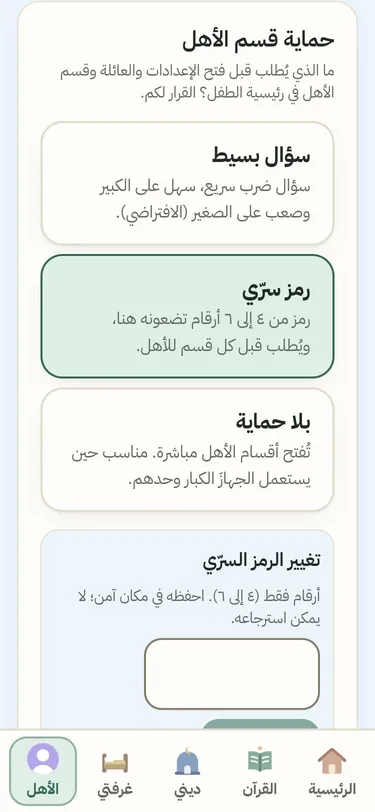
Choose how to protect the parents’ section: a simple multiplication question (the default), a PIN of four to six digits that you should remember well because it can’t be recovered, or “No protection” for devices used only by adults. Unless you choose “No protection,” whenever the learner is a child the gate protects the settings, the Family page, the Halaqa page, and every link that leads outside the app.
It’s a barrier that slows little ones down, not a security lock.
-
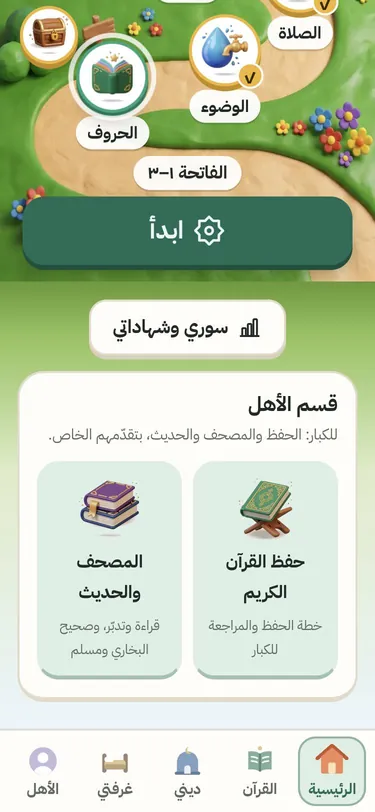
The parents’ section on the child’s screen
At the bottom of the child’s screen is the “Parents’ section” with two tiles: “Quran Memorization” and “Mushaf and Hadith.” They open through the parent gate, and then the app switches to an adult’s profile, so your child’s progress doesn’t get mixed up with yours. The adults’ learning paths don’t appear among the stations on the child’s journey.
-
Family dashboard
Each learner’s progress this week in one place: what was memorized, what was reviewed, time spent learning, and what still needs to be recited to you, alongside their reading and Tajweed progress.
It only includes the learners added on this same device.
-
“Hear them recite”
Hear your child recite ayah by ayah, with the text hidden until you reveal it, then choose “Correct,” “Small reminder,” or “Needs repeating.” Your rating goes into their review schedule.
-

Backup to a file
Save your family’s progress to a file on your device, and move it to another device whenever you like. When restoring, you’ll see the learners’ names before merging: anyone in the file has their progress on this device replaced by what’s in the file, and anyone not in it stays as they are.
The file isn’t encrypted, so keep it somewhere safe. It doesn’t include voice recordings, downloaded recitations or settings. Because we don’t keep any copy, we can’t recover anything that’s lost, so save a fresh copy from time to time.
-
Progress card for the Halaqa teacher
The learner shows a progress card with a QR code, and the Halaqa teacher scans it with their device’s camera. The card shows the first name or a nickname you choose, plus the progress numbers, and the teacher keeps a copy in their student list on their own device only.
There’s no account and nothing is sent over the internet, so only show the card to people you trust.
-
In your language
The interface and lesson explanations come in eight languages: Arabic, English, Turkish, German, Swedish, Persian, Kurdish (Sorani), and Somali, which you can choose in the settings. The Mushaf text, the letters and words your child learns to read, and the du'as and Hadiths stay in Arabic, exactly as they are.
This translation was made with the help of AI. If you notice a mistake, please write to us so we can fix it.
How to get started
Three simple steps
No sign-up and no long setup.
- Step 1
Open the app
From your phone or computer browser at app.thimarcom.app, and install it on your home screen if you like. The first time you open it, you’ll need the internet so the app can get ready to work without it.
- Step 2
Add your learners
A profile for each child and each adult: a name (a nickname or short name is enough), a badge, and a starting point. A child takes a short reading test guided by a parent to find where to start, and an adult starts from the lesson that suits them.
- Step 3
A short portion every day
The “Today” page prepares your daily portion so you can start it with one button, and each session is only as long as today’s portion. If you’re away for a few days, nothing gets locked.
Our principles
Clear promises we stand by
Thimarcom is a nonprofit charity project that we offer for the sake of Allah, and we hope it will be an ongoing charity (sadaqah jariyah). These are our promises to you, and most of them are built into the app itself.

Completely free
No ads, no subscriptions, no in-app purchases, and no “premium version.” The service is free for everyone, and, Allah willing, we intend to keep it that way.
No sign-up, no account
Just open it and begin. No email, no password, no sign-in.
Your progress stays on your devices
No analytics tools, no tracking, and no cookies in the app. We don’t sell or share data, and we don’t ask for your location. The app connects only to our website (through our hosting provider) and to EveryAyah.com (through the BunnyCDN network) for the reciters’ recitations. Like any website, these servers can see your device’s internet address (IP), but we send no name and no data about the learner along with it. We also have an automated test that checks the app’s code and rejects any tracking tool or any connection to an unapproved party.
Well-known sources, credited to their owners
Al-Tafsir Al-Muyassar from the King Fahd Complex for the Printing of the Holy Quran is shown exactly as published, unedited. The recitations are in their reciters’ own voices from EveryAyah.com, the Tajweed rule positions are from the quran-tajweed project, and the texts of Sahih al-Bukhari and Sahih Muslim are from an open source. We credit all of this to its owners. May Allah reward them with goodness.
Works offline after you first open it
Open it once while online, and it saves the Mushaf text, the tafsir and the lesson texts on your device. Audio is downloaded separately: reciters’ recitations Surah by Surah from the Downloads page, while lesson audio is saved after you hear it the first time.
The Mushaf text exactly as it is, letter by letter
The Mushaf text is from the Tanzil project (Tanzil) in the narration of Hafs from ʿAsim, shown exactly as it is, letter by letter, without any manual editing, and protected by a digital fingerprint that automated tests check.
A learning tool, not a fatwa source
Thimarcom helps parents and teachers with understanding and practice, but it doesn’t replace learning directly from a skilled teacher, and it isn’t a fatwa body. For religious questions, please turn to the scholars in your country.
Kindness before motivation
We never say “You broke your streak!” Instead, we welcome back whoever returns and carry on from where they left off. One screen for one task, a limited daily portion, and in “Step by step” mode the app ends the session on its own and says “That’s enough for today.”
Installation
Install it on your screen in a minute
Thimarcom is a web app: it opens in the browser, and once added to your home screen it works like any other app. Updates arrive without an app store, and it offers to install them with a single tap.
iPhone and iPad devices
Open app.thimarcom.app in Safari, tap the Share button, then choose “Add to Home Screen” and tap “Add.”
We recommend installing it first and then starting from the icon, because progress is saved where you use the app: on iPhone and iPad, Safari and the icon each keep their own data separately, and you can move between them using the backup file.
Android
Open app.thimarcom.app in Chrome, then tap the menu button (⋮) and choose “Install app” or “Add to Home screen.”
Computer
In Chrome or Edge, click the install icon in the address bar, or choose “Install app” from the browser menu. You can also use it directly in any modern browser without installing it.
After you first open it
Keep the internet on the first time until you see the message “The app is ready to work offline.” Then, from the Downloads page, download the recitations of the Surahs you want to hear offline, or all of Juz ʿAmma.
Frequently asked questions
Before you begin
Short, honest answers to the questions parents usually ask.
Is Thimarcom really free?
Yes, completely free, and, Allah willing, we intend to keep it that way. It’s a nonprofit charity project that we hope will be an ongoing charity (sadaqah jariyah), with no ads, no subscriptions, no in-app purchases, and no “premium version.” The coins your child earns are virtual: they can’t be bought with money and have no value outside the app.
What ages is Thimarcom for?
Designed for families, from children aged four to adults. Little ones get an illustrated journey with big buttons, where they learn alongside their parents, and adults get memorization and review plans, plus a “Step by step” mode for those who need to go gradually. Each learner starts where it suits them: a child takes a short test guided by a parent, and an adult chooses where to begin.
Does it work offline?
Yes, after you open it the first time. Open it once while online so it saves the Mushaf text, the tafsir and the lesson texts on your device, and after that they work offline. Audio doesn’t come with the app: download the recitations of the Surahs you want, or all of Juz ʿAmma, from the Downloads page. Lesson audio is saved after you hear it the first time, and each of the two Hadith books is downloaded separately. Anything you haven’t downloaded needs the internet when you listen to it.
Where is my children’s data stored?
On your device, in the app’s own browser storage, and none of it reaches us except a file you choose to send. We don’t ask you for any personal data, we don’t keep any data about learners, we don’t use cookies or analytics tools, and we don’t sell or share data. The app connects only to our website and its hosting provider, and to EveryAyah.com (through the BunnyCDN network) to fetch recitations. Like any website, these servers can see your device’s internet address (IP), but we send no data about the learner along with it. Recitation recordings never leave the device. The browser may clear the site’s data if your device’s storage fills up or if you don’t use it for a long time, so save a backup from time to time.
Do I need an account?
No. There’s no sign-up and no password; parents add a profile for each learner on the same device. And because there’s no account and no server storing your data, there’s no syncing between devices: to move to another device, use the backup file from the Family page. Save it from time to time, because we don’t keep any copy and can’t recover anything that’s lost.
Where does Thimarcom’s content come from?
The Mushaf text is from the Tanzil project (Tanzil) in the narration of Hafs from ʿAsim, shown exactly as it is, letter by letter, without any editing, and protected by a digital fingerprint that automated tests check. Al-Tafsir Al-Muyassar (King Fahd Complex, in the Tanzil project edition) is shown exactly as published, unedited and credited to the Complex, and the similar ayahs are calculated automatically from the text. The recitations are from EveryAyah.com, the Tajweed rule positions are from the quran-tajweed project, and the texts of Sahih al-Bukhari and Sahih Muslim come from an open source. As for the lessons, from reading and Tajweed and the Faith Corner for children to “Manners, rulings and understanding” for adults, they are written in simple, gradual language and point out where scholars differ, where needed. If you notice a mistake in any content, please write to us so we can fix it. Thimarcom is a learning tool, not a fatwa source, and learning directly from a skilled sheikh is the foundation.
What devices does it work on, and how do I install it?
It works in modern browsers on phones, tablets and computers. Open it at app.thimarcom.app, then add it to your home screen so it works like any other app: on iPhone and iPad, from Safari using the Share button and then “Add to Home Screen,” and on Android, from the Chrome menu. Updates arrive without an app store, and it offers to install them with a single tap.
What languages does Thimarcom come in?
The app’s interface and lesson explanations come in eight languages: Arabic, English, Turkish, German, Swedish, Persian, Kurdish (Sorani), and Somali, chosen in the settings. The Mushaf text stays in Arabic exactly as it is, and so do the letters and words your child learns to read. So learning to read the Quran in Arabic is open to those who don’t speak it, with explanations in their own language. The translation was made with the help of AI, so if you notice a mistake, please write to us.
Is it on the App Store or Google Play?
Not yet. Today Thimarcom is a web app that opens in the browser and installs straight to your home screen, so it doesn’t need an app store.
How can I contact you?
Write to us at support@ssk-appen.se, the official email of the Thimarcom project and its owner, Nazir Al-Absi, with any question, feedback or privacy request, or if you notice a mistake in any content.
وَلَقَدْ يَسَّرْنَا ٱلْقُرْءَانَ لِلذِّكْرِ فَهَلْ مِن مُّدَّكِرٍۢ
Thimarcom
A small seedling every day… and a fruit that lasts
“Thimar” means “fruits,” and we add “-com” (“your”) because the fruit is yours. Learning the Quran is a young plant watered every day with a short daily portion, and by Allah’s will it bears fruit: correct reading, solid memorization, and good manners with the words of Allah, for young and old in the same home. And the fruit belongs to the one who grew it: each learner’s progress stays with them, on their own device.